

푸쉬메세지
들어가기전에….
FCM은 Android 기기의 Google Play 서비스와 Apple 기기의 APNs(Apple Push Notification Service)를 통해 작동하며, 이는 Google과 Apple이 자체적으로 제공하는 고성능 네이티브 푸시 서비스입니다
Java 서버를 사용하여 포그라운드 상태에서 실시간 알림을 제공하는 시스템은 만들 수 있지만, 백그라운드와 종료 상태에서의 알림 전달을 위해서는 FCM 또는 APNs 같은 네이티브 푸시 서비스가 필요합니다.
결론, 자체적으로 만드는것은 한계가잇어 FCM사용하여 만들어야한다.
Firebase 등록


여기서부터는 Flutter App에 직접연동해야될것같아 초기화코드는 추가하지않았다.
Firebase CLI
curl -sL https://firebase.tools | bash
firebase login
에러
[1] 23099 killed
firebase login --no-localhost
해결 : 다시 설치하니되었다.
curl -sL firebase.tools | upgrade=true bash

사용자계정에 액세스여부 테스트
firebase projects:list
FlutterFire CLI 설치
dart pub global activate flutterfire_cli
sudo vi ~/.zshrc
export PATH="$PATH":"$HOME/.pub-cache/bin"
추가 환경설정
Flutter configuration
flutterfire configure
에러
Package name for Android app cannot be empty

Andorid는 추가하면 해결된다.

core library 추가
flutter pub add firebase_core
참고
: https://zzingonglog.tistory.com/36
에러시참고
: https://kjmhercules.tistory.com/36
: https://stackoverflow.com/questions/70760326/flutter-on-ios-redefinition-of-module-firebase

여기까지 기본 세팅
firebase_messaging 추가
flutter pub add firebase_messaging
API 통해 푸쉬메세지 발송시 Google Api Auth 추가
flutter pub add googleapis_auth
FCM 포그라운드상태일때 푸시는 상단에 발생하지않는데, 이를대비하여 flutter_local_notifications패키지도 추가
flutter pub add flutter_local_notifications
Firebase 비공개 키만들기
- Firebase console 좌측 상단 프로젝트 개요에서 톱니바퀴 > 클라우드 메시징 탭
- 발신자ID 옆, 서비스계정 이동
- 서비스계정에 이메일 링크클릭
- 새로운 키생성

assets/data/auth.json 으로 위치 ( 이름은 임의 선택 ).
pubspec.yaml. 파일에 경로추가
AndroidManifest.xml 자동 초기화 중지 설정
: 사용자 등록토큰이, 앱설치 등을 이유로 달라질때 재발급하는것을 위함
참고 : https://zzingonglog.tistory.com/40.
PushNotificationService.py
import 'package:flutter_local_notifications/flutter_local_notifications.dart';
import 'package:firebase_messaging/firebase_messaging.dart';
import 'package:firebase_core/firebase_core.dart';
import 'package:linker_manager/firebase_options.dart';
import 'package:flutter/material.dart';

// GlobalKey for navigation
final navigatorKey = GlobalKey<NavigatorState>();

@pragma('vm:entry-point')
Future<void> _firebaseMessagingBackgroundHandler(RemoteMessage message) async {
  if (message.notification != null) {
    print("Notification Received in Background!!");
  }
}

class PushNotificationService {
  static final FlutterLocalNotificationsPlugin _localNotificationsPlugin =
      FlutterLocalNotificationsPlugin();

  static Future<void> init() async {
    // Firebase 초기화
    await Firebase.initializeApp(
        options: DefaultFirebaseOptions.currentPlatform);

    // iOS 권한 요청 (iOS의 경우 필요)
    await FirebaseMessaging.instance.requestPermission();

    // iOS 및 Android 초기화 설정
    const AndroidInitializationSettings initializationSettingsAndroid =
        AndroidInitializationSettings('@mipmap/ic_launcher');

    const DarwinInitializationSettings initializationSettingsIOS =
        DarwinInitializationSettings(
      requestSoundPermission: true,
      requestBadgePermission: true,
      requestAlertPermission: true,
    );

    const InitializationSettings initializationSettings =
        InitializationSettings(
      android: initializationSettingsAndroid,
      iOS: initializationSettingsIOS, // iOS 설정 추가
    );

    // flutter_local_notifications 초기화
    await _localNotificationsPlugin.initialize(initializationSettings);

    // 백그라운드 메시지 처리 핸들러 설정
    FirebaseMessaging.onBackgroundMessage(_firebaseMessagingBackgroundHandler);

    // 포그라운드 메시지 수신 리스너
    FirebaseMessaging.onMessage.listen((RemoteMessage message) {
      if (message.notification != null) {
        _showLocalNotification(message);
      }
    });

    // 푸시 알림과의 상호작용 설정
    setupInteractedMessage();
  }

  // 로컬 알림 표시
  static Future<void> _showLocalNotification(RemoteMessage message) async {
    const AndroidNotificationDetails androidPlatformChannelSpecifics =
        AndroidNotificationDetails(
      'high_importance_channel',
      'High Importance Notifications',
      importance: Importance.high,
      priority: Priority.high,
    );
    const NotificationDetails platformChannelSpecifics =
        NotificationDetails(android: androidPlatformChannelSpecifics);

    await _localNotificationsPlugin.show(
      message.hashCode,
      message.notification?.title,
      message.notification?.body,
      platformChannelSpecifics,
    );
  }

  // 앱 상호작용 함수 (알림을 클릭해 앱 열기 등)
  static Future<void> setupInteractedMessage() async {
    RemoteMessage? initialMessage =
        await FirebaseMessaging.instance.getInitialMessage();
    if (initialMessage != null) {
      _handleMessage(initialMessage);
    }

    FirebaseMessaging.onMessageOpenedApp.listen(_handleMessage);
  }

  static void _handleMessage(RemoteMessage message) {
    navigatorKey.currentState?.pushNamed('/message', arguments: message);
  }
}
Main.dart
import 'package:flutter/material.dart';
import 'package:flutter_localizations/flutter_localizations.dart';
import 'package:linker_manager/screens/lauch_screen.dart';
import 'package:linker_manager/screens/main_screen.dart';
import 'package:linker_manager/screens/map_screen.dart';
import 'package:linker_manager/style/themedata.dart';
import 'services/push_notification_service.dart';

void main() async {
  WidgetsFlutterBinding.ensureInitialized();
  await PushNotificationService.init(); // 푸시 알림 초기화
  runApp(const LinkerManager());
}

class LinkerManager extends StatelessWidget {
  const LinkerManager({super.key});

  @override
  Widget build(BuildContext context) {
    return MaterialApp(
      navigatorKey: navigatorKey,
      home: const LauchScreen(),
      localizationsDelegates: const [
        GlobalMaterialLocalizations.delegate,
        GlobalCupertinoLocalizations.delegate,
        GlobalWidgetsLocalizations.delegate,
      ],
      locale: const Locale('ko', 'KR'),
      theme: buildDarkTheme(),
      supportedLocales: const [
        Locale('en', 'US'), // English
        Locale('ko', 'KR'), // Korean
      ],
      routes: {
        '/MainPage': (BuildContext context) => const MainScreen(),
        '/MapPage': (BuildContext context) => const MapScreen(),
      },
    );
  }
}
토큰 발급시 에러남
IOS 권한추가 : ios/Runner/Info.plist
에러코드
FLTFirebaseMessaging: An error occurred while calling method Messaging#getToken, errorOrNil => {
    NSLocalizedFailureReason = "Invalid fetch response, expected 'token' or 'Error' key";
}
추정되는원인
• FCM이 iOS에서 푸시 알림을 보내려면 APNs 인증 키가 필요합니다.
• Firebase Console에서 프로젝트 설정으로 이동하고 iOS 앱에 APNs 인증 키를 추가했는지 확인합니다.
• APNs 인증 키가 누락된 경우, Apple Developer Portal에서 APNs 인증 키를 생성하고 이를 Firebase Console에 업로드해야 합니다.

전제조건 : App Developer 등록해야한다 [ 129,000 원 2024.10.26 ]

key 발급받고 ~.p8 파일 다운로드받는다. 한번밖에 처리안되니 주의해야함.

ios/Runner/Info.plist 권한 추가
<key>UIBackgroundModes</key>
<array>
  <string>fetch</string>
  <string>remote-notification</string>
</array>
<key>FirebaseAppDelegateProxyEnabled</key>
<false/>
Xcode 푸시 알림 활성화
• Xcode에서 iOS 프로젝트를 열고, Target > Signing & Capabilities로 이동합니다.
• Push Notifications 및 Background Modes(Background fetch, Remote notifications)를 활성화합니다.
Try 2 : 위와같이 진행해도 여전히 Token 관련에러가난다.
flutter doctor 확인

**cmdline-tools 컴포넌트가 없다는 오류
Android SDK Command-line Tools 다운로드페이지 이동하여설치
/Users/사용자이름/Library/Android/sdk/
위치에 압축해제한 cmdline-tools 폴더이동
vi ~/.zshrc

export ANDROID_SDK_ROOT=$HOME/Library/Android/sdk
export PATH=$PATH:$ANDROID_SDK_ROOT/cmdline-tools/latest/bin
export PATH=$PATH:$ANDROID_SDK_ROOT/platform-tools
**Android license status unknown.
flutter config --android-studio-dir "안드로이드 스튜디오 위치"
flutter config --android-sdk "안드로이드 SDK 위치"
flutter config --android-studio-dir "/Applications/Android Studio.app"
flutter config --android-sdk "/Users/yujongtae/Library/Android/sdk"

Tools > SDK Manager > Android SDK

IOS Capability.에서 Push Notification

해결 : https://jpointofviewntoe.tistory.com/172?category=1089376.
Xocde에서 [TARGET] -> [Singing & Capabilieties] -> Background Modes / Push Notifications
추가한 이후에
Runner.entitlements 파일이 생겨야한다.
위에 절차를 모두진행하고 앱을 삭제하고 다시빌드하니까 정상 토큰발급되었다.
NSLocalizedFailureReason = "Invalid fetch response, expected 'token' or 'Error' key";
이 에러가계속나온다.
- wifie 변경해서 재설치 빌드 : 안됨
- GoogleService-info.plist : 다시다운받아서 진행 안됨
Error initializing Firebase: [core/duplicate-app] A Firebase App named "[DEFAULT]" already exists초기화가 계속에러나서인것같다.
import Flutter
import UIKit
import GoogleMaps
// import Firebase // Add Line.

@UIApplicationMain
@objc class AppDelegate: FlutterAppDelegate {
  override func application(
    _ application: UIApplication,
    didFinishLaunchingWithOptions launchOptions: [UIApplication.LaunchOptionsKey: Any]?
  ) -> Bool {
    GeneratedPluginRegistrant.register(with: self)

    // FirebaseApp.configure() // Add Line.

    return super.application(application, didFinishLaunchingWithOptions: launchOptions)
  }
}
Runner/AppDelegate.swift 에서 주석 처리하고 다시 진행함
프로젝트명을 명시하고 다시 진행하면 초기화는 제대로 되나 여전히 토큰에러가 발생한다.
  try {
      if (Firebase.apps.isEmpty) {
        await Firebase.initializeApp(
          name: "linker-manager",
          options: DefaultFirebaseOptions.currentPlatform,
        );
        print("Firebase initialized successfully");
      } else {
        print("Firebase is already initialized");
      }
    } catch (e) {
      print("Error initializing Firebase: $e");

    }
Firebase login
Firebase projects
flutterfire configure --project=<yourprojectID>
프로젝트 초기화되지 않은 이유는 해결되나 토큰은 여전히 에러난다.
Firebase 버전 문제라고 많이 하는데…
APN문제라고하여 다시
Yes, I removed the APNs and created new ones. Then, I replaced the old APNs in the Firebase console with the new ones.
….
key > Certificates, Identifiers & Profiles
다시해봤지만 여전히 에뮬레이터에서 안된다….
토큰이 만료되었을 때, 강제 갱신해주는법
사용자 고유ID 와, 토큰을 서버에 계속 보내줘야한다.
  static Future<void> getFCMToken() async {
    _firebaseMessaging.onTokenRefresh.listen((newToken) {
      print("Token refreshed: $newToken");
      // Send the new token to your server
    });

    // FCM 등록 토큰 요청
    String? iosToken = await _firebaseMessaging.getAPNSToken();
    print("ios token :  $iosToken");
    // _token = await _firebaseMessaging.getToken();

    try {
      _token = await _firebaseMessaging.getToken();
      print("FCM Registration Token: $_token");
    } catch (e) {
      print("Error fetching FCM token: $e");
    }
  }
[FirebaseCore][I-COR000005] No app has been configured yet.
ios/Runner/AppDelegate.swift
import UIKit
import Flutter
import Firebase // Add Line.

@UIApplicationMain
@objc class AppDelegate: FlutterAppDelegate {
  override func application(
    _ application: UIApplication,
    didFinishLaunchingWithOptions launchOptions: [UIApplication.LaunchOptionsKey: Any]?
  ) -> Bool {
    FirebaseApp.configure() // Add Line.
    GeneratedPluginRegistrant.register(with: self)
    return super.application(application, didFinishLaunchingWithOptions: launchOptions)
  }
}
위에 내용은 틀렸다. Flutter. 에서 configure 처리하고있어서 불필요함
Message 가 안보내져서
보내는. API 만들어서 테스트
Google APi Oauth
**Debug 모드에서는 실행안되고, 배포환경에서만된다.
**토큰은 Build 환경에서 Refresh도니다.
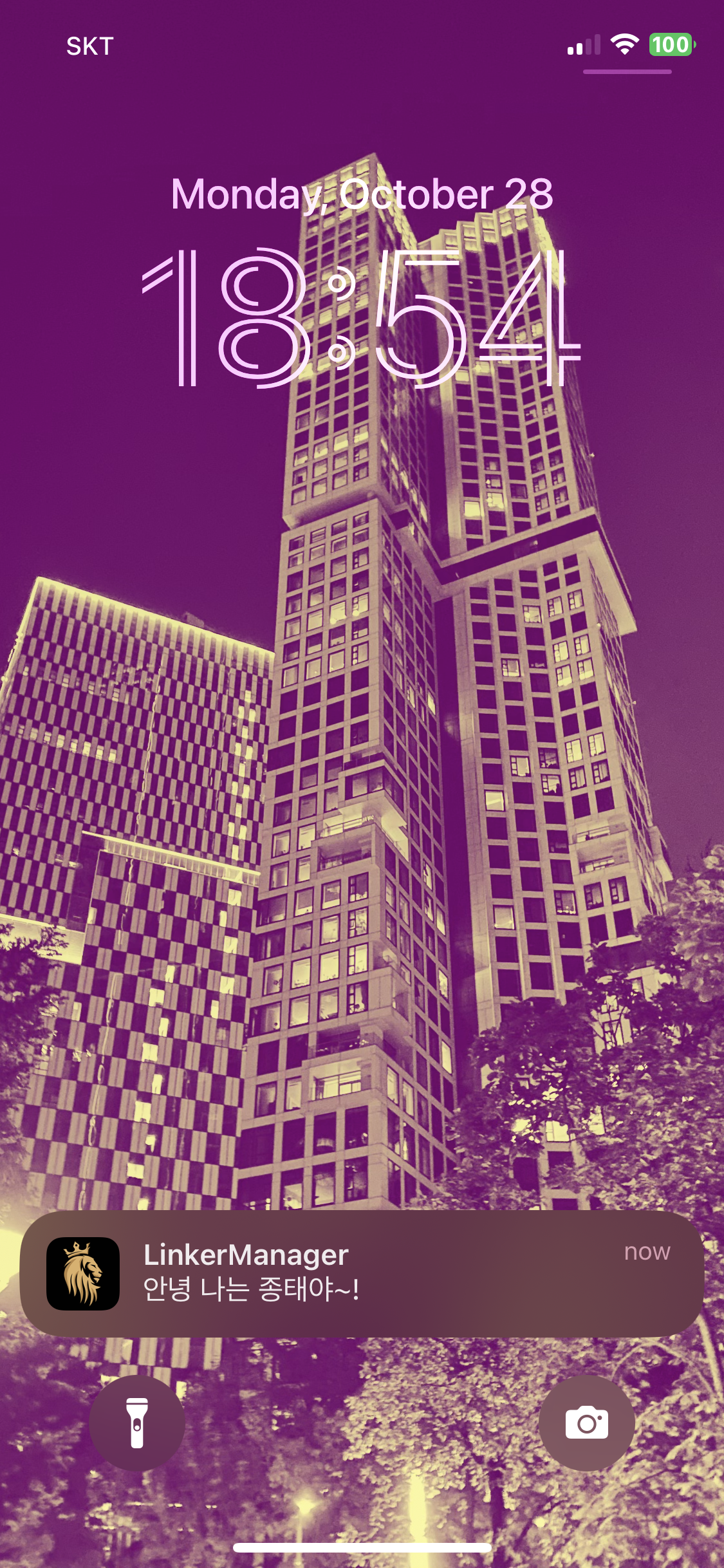
Server.쪽에서 전송하여 Push Message 발송하는방법
의존성추가
dependencies {
    implementation 'org.springframework.boot:spring-boot-starter-web' // Spring Web Starter
    implementation 'com.google.auth:google-auth-library-oauth2-http:1.5.0' // Google Auth Library for OAuth2
    implementation 'org.springframework.boot:spring-boot-starter-json' // JSON 처리 (필요시)
}
Service
package kr.linker.linkermain.service.CO;

import org.springframework.stereotype.Service;

import com.google.auth.oauth2.GoogleCredentials;
import com.google.auth.oauth2.ServiceAccountCredentials;
import org.springframework.stereotype.Service;
import org.springframework.web.client.RestTemplate;
import org.springframework.http.HttpEntity;
import org.springframework.http.HttpHeaders;
import org.springframework.http.MediaType;

import java.io.FileInputStream;
import java.io.IOException;
import java.util.Collections;
import java.util.HashMap;
import java.util.Map;

@Service
public class FirebaseNotificationService {
    private static final String FCM_URL = "https://fcm.googleapis.com/v1/projects/linker-manager/messages:send";
    private static final String SCOPES = "https://www.googleapis.com/auth/cloud-platform";
    private static final String CREDENTIALS_PATH = "src/main/resources/auth/auth.json"; // Service Account JSON 경로

    public String sendNotification(String title, String body, String token) throws IOException {
        // Access Token 발급
        GoogleCredentials googleCredentials = getGoogleCredentials();
        googleCredentials.refreshIfExpired();
        String accessToken = googleCredentials.getAccessToken().getTokenValue();

        // 알림 데이터 생성
        Map<String, Object> notificationData = createNotificationData(title, body, token);

        // HTTP 요청 전송
        RestTemplate restTemplate = new RestTemplate();
        HttpHeaders headers = new HttpHeaders();
        headers.setContentType(MediaType.APPLICATION_JSON);
        headers.setBearerAuth(accessToken);

        HttpEntity<Map<String, Object>> request = new HttpEntity<>(notificationData, headers);
        return restTemplate.postForObject(FCM_URL, request, String.class);
    }

    private GoogleCredentials getGoogleCredentials() throws IOException {
        FileInputStream serviceAccountStream = new FileInputStream(CREDENTIALS_PATH);
        return ServiceAccountCredentials.fromStream(serviceAccountStream)
                .createScoped(Collections.singleton(SCOPES));
    }

    private Map<String, Object> createNotificationData(String title, String body, String token) {
        Map<String, Object> message = new HashMap<>();
        Map<String, Object> notification = new HashMap<>();
        notification.put("title", title);
        notification.put("body", body);
        message.put("token", token);
        message.put("notification", notification);

        Map<String, Object> request = new HashMap<>();
        request.put("message", message);
        return request;
    }

}
Controller
package kr.linker.linkermain.controller.CO;


import kr.linker.linkermain.service.CO.FirebaseNotificationService;
import org.springframework.beans.factory.annotation.Autowired;
import org.springframework.web.bind.annotation.*;

import java.io.IOException;
import java.util.Map;

@RestController
@RequestMapping("/api/CO/notifications")
public class NotificationController {

    private final FirebaseNotificationService firebaseNotificationService;

    @Autowired
    public NotificationController(FirebaseNotificationService firebaseNotificationService) {
        this.firebaseNotificationService = firebaseNotificationService;
    }

    @PostMapping("/send")
    public String sendNotification(@RequestBody Map model) {
        String title =model.get("title").toString();;
        String body =model.get("body").toString();;
        String token=model.get("token").toString();;

        try {
            return firebaseNotificationService.sendNotification(title, body, token);
        } catch (IOException e) {
            return "Error sending notification: " + e.getMessage();
        }
    }
}
Background 환경에서 잘되나 ForeGround. 환경에서되어야한다.
XCode의 Runner > AppDelegate.swift
if #available(iOS 10.0, *) {
	UNUserNotificationCenter.current().delegate = self as? UNUserNotificationCenterDelegate
}
추가


@UIApplicationMain
@objc class AppDelegate: FlutterAppDelegate {
override func application
application: UIApplication,
didFinishLaunchingWithOptions launchOptions: [UIApplication.LaunchOptionsKey: Any]?
) → Bool {
if #available(ioS 10.0, *) <
UNUserNotificationCenter.current).delegate = self
as? UNUserNotificationCenterDelegate
GeneratedPluginRegistrant.register(with: self)
해결됨…
참고 : https://zzingonglog.tistory.com/40